For the complete documentation index, see llms.txt. The full corpus is available at llms-full.txt. This page is also available as Markdown by appending
.mdto the URL.
Claiming an account
A claim is your signed word that an account is yours. Nothing checks it. It shows as Claimed on your profile, kept in its own section so a reader can tell at a glance what was checked and what was not.
What a claim does and does not do
Section titled “What a claim does and does not do”| Claim | Verified account | |
|---|---|---|
| Shown on your profile | Yes, under Claimed | Yes, under Verified |
| Goes into your signed manifest | Yes, once you publish | Yes, once you publish |
| Counts toward your trust score | No | Yes |
| Can hold a short handle | Never | On a key platform or a domain |
Scarce handles are backed by something you actually proved, so no number of claims takes one from somebody who can prove it.
When a claim is the right answer
Section titled “When a claim is the right answer”Use one when the platform gives no way to prove anything: no OAuth app, no readable page, no post the platform will confirm the author of. That is most of the long tail.
A claim is not worthless in that situation, but its value is borrowed. It is believable in proportion to everything around it. An identity with a verified domain and four verified platform accounts saying “this Goodreads profile is also me” is credible. The same sentence on an identity with nothing verified is just a sentence.
Adding one
Section titled “Adding one”Claiming has a tab of its own, Claim, which holds your claimed list and three separate forms under it: Claim a profile (self-attested), Contact email, and Crypto wallets. They sit apart from verification on purpose: the stronger routes are offered first on the Verify tab, and this is what is left when none of them apply.
Fill in the platform, the handle, and a link to the account if you have one, then press Add claimed profile. Pasting an Orynth profile link fills in the platform and the handle for you.
The new row joins the same list as your verified accounts, in its own Claimed group. Reordering is a drag by the grip on the left. On a touch screen, press the reorder toggle above the list to swap the grips for up and down buttons.
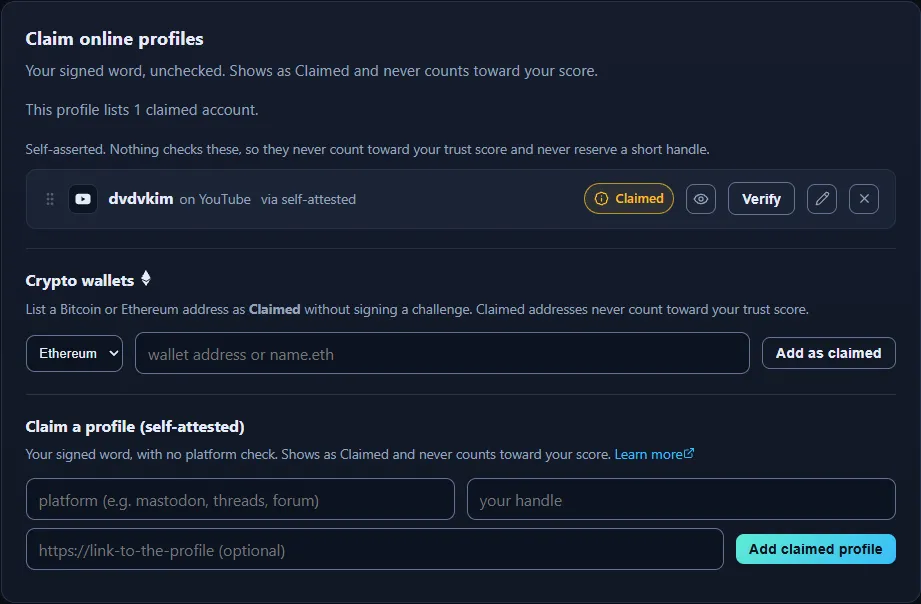
Claims live under Identity > Claim, kept in a separate section from Verify for the same reason the public profile keeps the two lists apart.
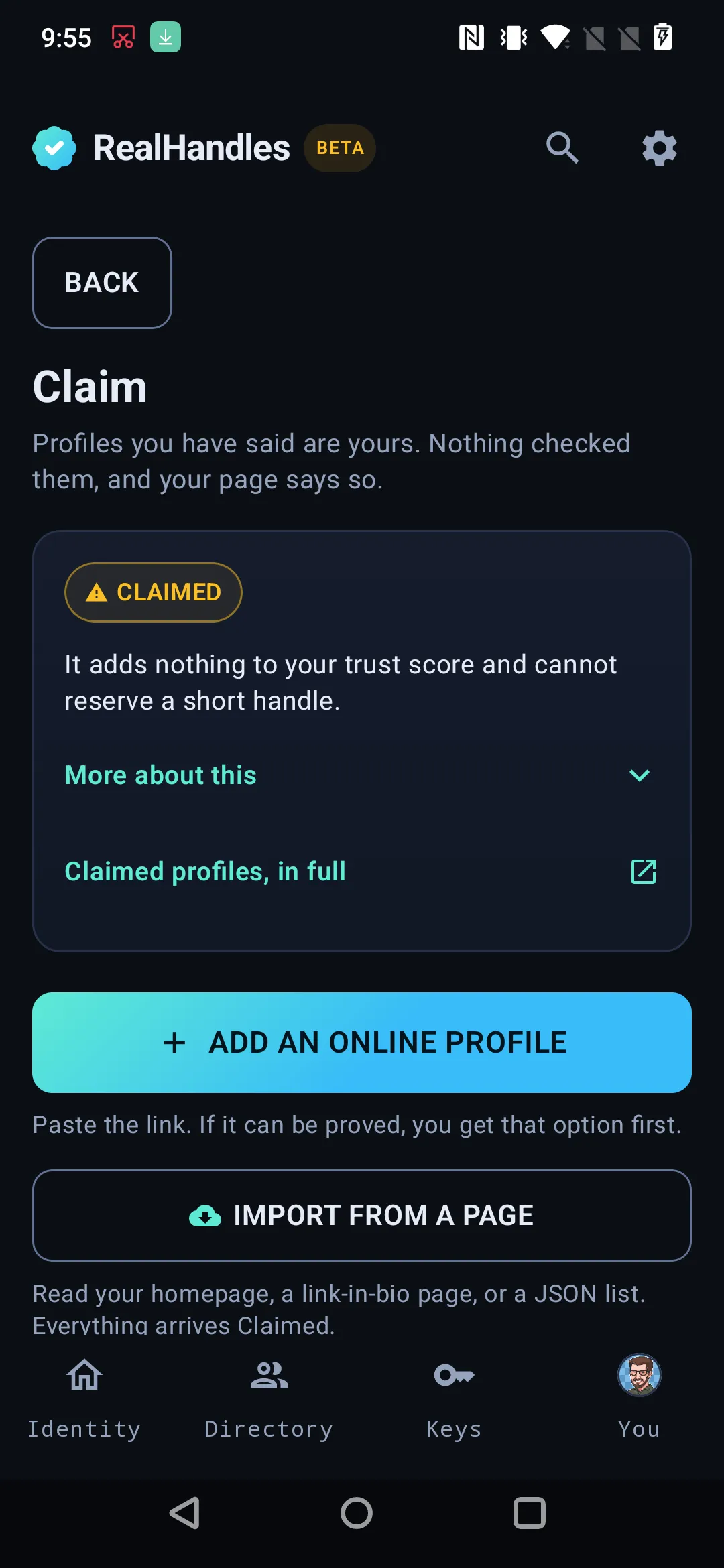
Claimed accounts are kept apart from verified ones for the same reason the website separates them: they are your word, they add nothing to the trust score, and they never satisfy the handle reservation gate. Only a first-party verified proof moves that number.
Adding one starts where a verification starts: Add an account, paste the link. If nothing can confirm that link the app says so and offers to record it as Claimed. If something can confirm it, the stronger route is offered first, which is the right default. Either way you see which one you are getting before you commit to it.
You can also enter a claim by hand, with the platform, the handle, and an optional profile link.
Each row has arrows to step it up or down, and a third control that opens To top, To bottom, and a box to type a position, so moving a row from eighty to three is one action rather than seventy-seven taps. Moves are held until you save them, and the order you set here is the order the manifest publishes.
Contact email
Section titled “Contact email”A contact email is a public mailbox on your profile, claimed the same way anything else is. Two things about it are worth saying plainly.
It is not your login. The address you sign in with is never published, and nothing links the two. Publishing a contact email is a separate decision about a separate address, which is the point of having the field at all.
It is Claimed and only Claimed. Nothing checks it. It adds nothing to your trust score and it never reserves a short handle. A Lightning Address has exactly the same you@example.com shape and is a different thing entirely, so read the platform on the row rather than the address.
On your public page the address is behind a click. The row reads Show email until a visitor asks for it, and only then does it become a mailto link with a copy button beside it. That is two problems at once: a scraper reading the page does not collect the address for free, and holding your phone up in a room does not broadcast it to everyone in the room.
Contact email is the second form on the Claim tab. Type the address and press Add as claimed.
The app has no separate form for it. Enter it as an ordinary claim, with email as the platform and the address as the handle. The public page treats it the same way the website does, click-to-reveal included, because that rule lives with the profile row rather than with the form that created it.
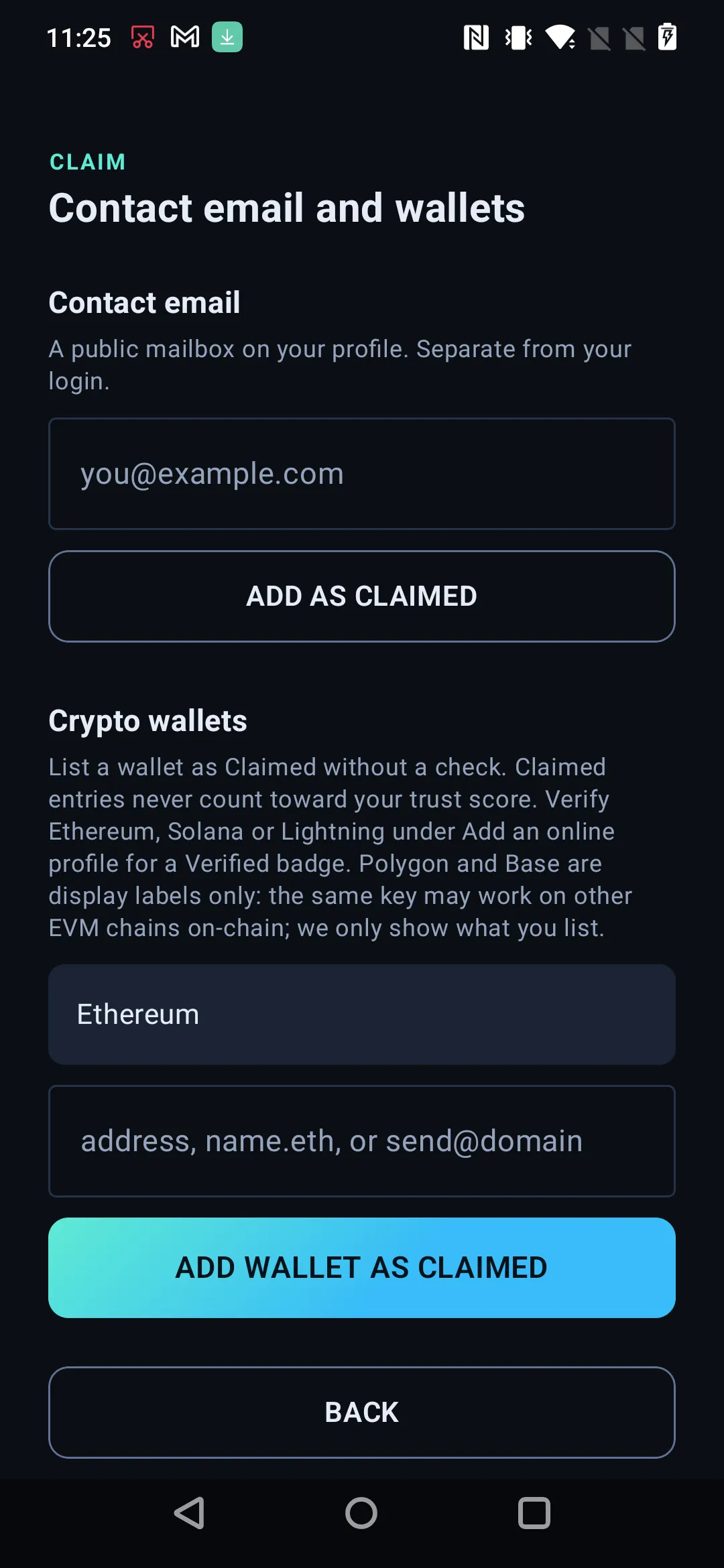
Crypto wallets
Section titled “Crypto wallets”Ethereum, Solana and a Lightning Address can be verified. Everything else in this space is listed rather than checked, and a claimed wallet is worth what any other claim is worth: it shows on your profile, it adds nothing to your trust score, and it never holds a short handle.
The chains offered are Ethereum, Solana, Bitcoin, Lightning, Polygon, Base and Other.
A wallet is counted as a wallet on your profile rather than as an account, so a count reads “2 verified accounts and 1 wallet” instead of calling an address an account.
Crypto wallets is the third form on the Claim tab: pick the chain, paste the address or name.eth, then Add as claimed.
Enter it as an ordinary claim, with the chain as the platform and the address as the handle.
Signal and WhatsApp
Section titled “Signal and WhatsApp”Both can be claimed by username, and both deliberately have no link on your public profile. The row offers copy instead.
That is not a missing feature. A working signal.me or wa.me link cannot be derived reliably from a username alone, and a link that resolves to the wrong person, or to nothing, is worse than no link on a page whose entire job is saying which account is yours. Copying the username is the honest action, so that is the action the row offers.
The same copy button appears on every payment and wallet row, for a different reason: an address nobody wants to retype is exactly the thing a visitor came to take with them.
Upgrading a claim later
Section titled “Upgrading a claim later”Nothing is stuck. If a platform becomes verifiable, verify the same account and the row moves from Claimed to Verified. What was already published stays published, because the history is append-only, and the next version you sign carries the new status.
It is still a signed statement
Section titled “It is still a signed statement”A claim is not a note in our database. Once you publish, it is inside a document signed by your key, which means you are on the record as having said it. That is the honest trade: nothing checked it, but you cannot later pretend you did not say it.
Publish for it to count
Section titled “Publish for it to count”Adding a claim changes realhandles.com straight away and changes your signed proof only when you publish. Until then no key has vouched for it, so a reader has only our word for it. See The signed manifest.