For the complete documentation index, see llms.txt. The full corpus is available at llms-full.txt. This page is also available as Markdown by appending
.mdto the URL.
Anchoring
An anchor is a copy of your signed identity, hosted somewhere you control. It is optional, it is one pointer among possible many, and it is never the identity. Your key is.
What an anchor buys you
Section titled “What an anchor buys you”One thing, and it is a big thing: if RealHandles disappears, the file you hosted is still there and still verifies against your key. Somebody who saved your keyId years ago can check it with no working RealHandles and no cooperation from anyone.
That is the whole value. An anchor does not make you more verified, it does not raise your trust score, and it does not affect which handle you can hold.
The two forms
Section titled “The two forms”A full manifest is self-contained. It survives us being gone, which is the point. It needs re-hosting every time you publish a new version, or the copy on your domain goes stale.
A pointer is signed once and hosted once. It proves you control the location and points at the always-current proof on RealHandles. Publishing again never means touching your server. The trade is that it is not self-contained: if RealHandles is gone, the pointer proves you control the domain but cannot show anyone what you claimed.
Either form goes at /.well-known/realhandles.json on your domain, or at a raw file URL you control.
Why a lapsed domain cannot take your identity
Section titled “Why a lapsed domain cannot take your identity”Every check asks the same question: is this file signed by the key we already trust?
A domain that lapses, or gets seized, or gets bought by somebody with your name hands over control of an address and nothing to sign with. Any file hosted at that location fails verification, because the signature is not yours and cannot be made to be.
So the worst case is that your anchor goes from verified to lapsed. Your key, your handle, your accounts, and your signed history are untouched, and nobody verifying you is misled for a moment. This is the did:plc property: follow the key, not the name.
The reverse also holds. Moving your anchor to a different domain changes nothing about who you are. It drops back to unchecked until the new location is confirmed, and that is all.
When an anchor goes back to unchecked
Section titled “When an anchor goes back to unchecked”- You moved it, or changed where we look.
- You rotated your key. The hosted file was signed by the retired key, so it no longer proves anything about the current one. Re-host and re-verify.
- The check ran and the file was missing, unreadable, or signed by a key that is not yours.
A check only reads the file. It never writes anything and never changes your identity, so running it as often as you like costs nothing.
Anchoring is not the same as a domain proof
Section titled “Anchoring is not the same as a domain proof”They are easy to confuse because both involve a domain you own.
| Domain proof | Anchor | |
|---|---|---|
| What it proves | You control the domain | A copy of your signed identity lives at a place you control |
| How | A one-time token in a file or a DNS TXT record | A signed file hosted at a known path |
| Effect on trust score | Yes | None |
| Effect on which handle you can hold | Yes, and it is the strongest kind of match | None |
| Why you want it | Stronger identity, scarcer handle | Your proof outlives RealHandles |
You can do both with the same domain. They are separate actions and either works without the other. See Verifying an account for the proof side.
Anchoring on a Gist, start to finish
Section titled “Anchoring on a Gist, start to finish”A Gist is the route when there is no domain to host on, and it is the one worth walking through because two steps in it are not obvious.
-
On the Publish tab, under Where to host it, choose GitHub Gist (no domain needed).
-
Press Download pointer file while the URL box is still empty.
This looks like it cannot work, since the box wants a Gist that does not exist and the Gist wants a file you do not have. It works anyway: saving the location is skipped when the box is blank, so the download goes ahead. The file is small and contains nothing private, just your key id, your public key, the canonical URL of your profile, and a signature over the three.
-
Create a public Gist with a file named
realhandles.jsonand paste the downloaded contents into it.Public rather than secret, because an anchor exists to be found. Nothing in the file is secret either: it is the same public key already published on your profile.
-
Copy the Raw URL, then delete the commit hash from it.
This is the step that quietly breaks anchors. GitHub hands you a Raw link pinned to the exact revision:
https://gist.githubusercontent.com/you/GIST_ID/raw/4cc92f1bffca7219246de.../realhandles.jsonThat URL will serve this version of the file forever, so if you ever replace the pointer the anchor keeps reading the old one. Remove the hash segment and use the form that always follows the latest revision:
https://gist.githubusercontent.com/you/GIST_ID/raw/realhandles.json -
Paste that URL into Gist raw URL, press Save anchor location, then press Verify anchor.
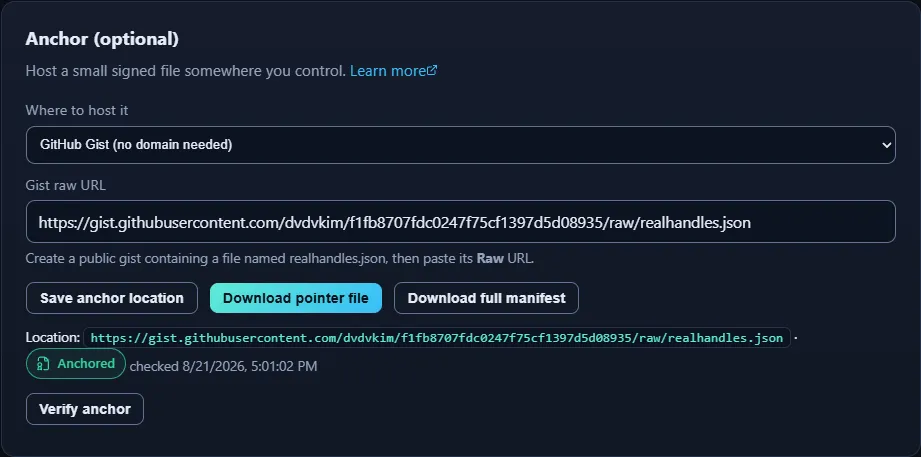
A pass reads Anchored, and says what it found: a signed pointer by a key it already trusts. It is checking the signature, not just that a file exists, so a Gist containing somebody else’s pointer fails here rather than passing quietly.
A pointer never needs touching again. It names your profile rather than copying it, so publishing a new version of your manifest does not invalidate it. A full manifest is the other trade: self-contained, and therefore stale the moment you re-sign unless you re-host it.
Where you set it
Section titled “Where you set it”The anchor panel is on the Publish tab of the dashboard.
A pointer file is signed once and hosted once. A full manifest is self-contained and keeps working even if RealHandles is gone, which is the case the anchor exists for. A Gist works when there is no domain to host on.
Save anchor location records where we should look, the two download buttons hand you the file to put there, and Verify anchor reads it back.
Identity > Data > Anchor your identity elsewhere.
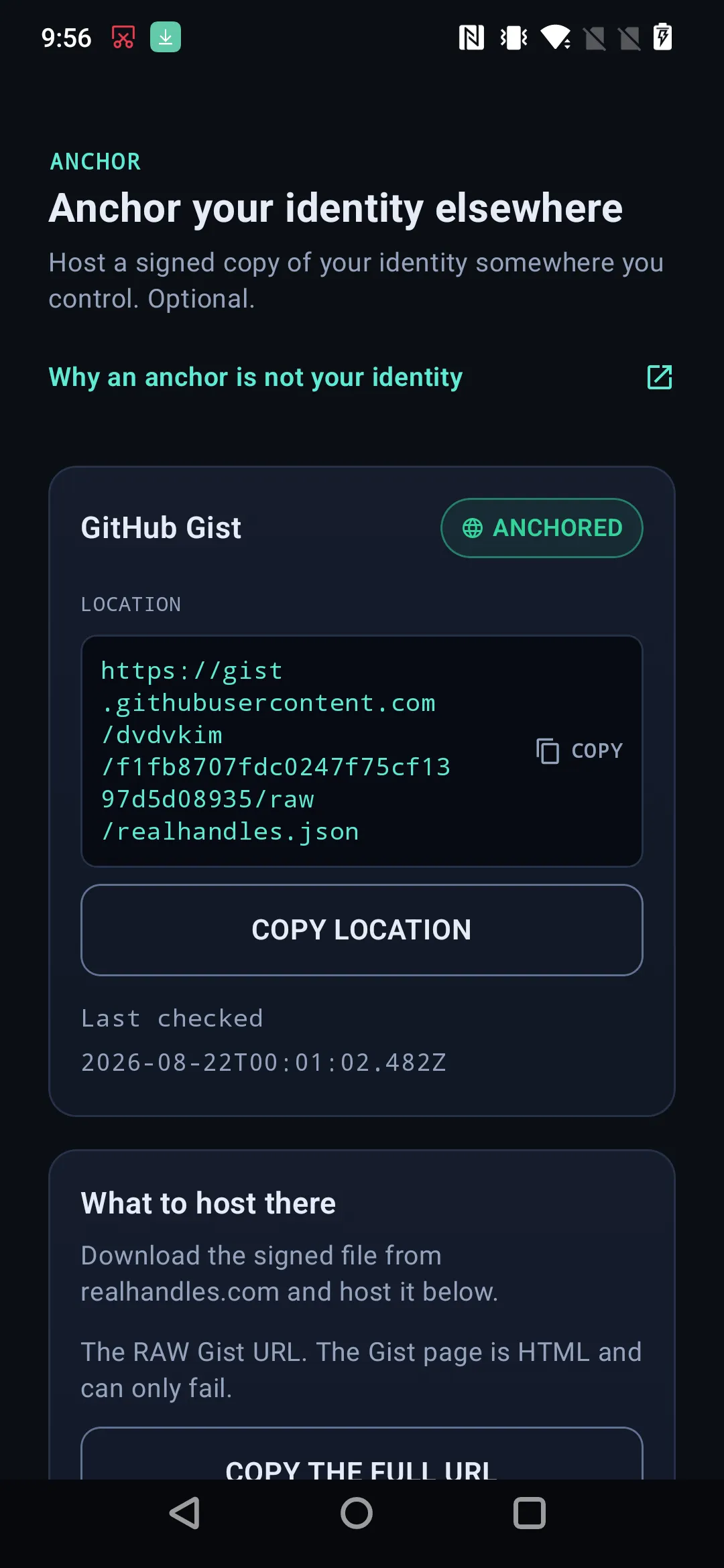
A domain you control, or a Gist when there is no domain.
The screen offers the same two hosts as the website, and prefills any domain you have already proved so the name does not have to be retyped. For a Gist it insists on the raw file URL, because the Gist page itself is HTML and a check against that finds no JSON.
The status line is the one on this page: anchored, lapsed, or not checked, with when it was last read. Check anchor runs it again, and the app repeats what is true, that a check only reads the file and can be run as often as you like.
Moving an anchor that currently verifies asks for a confirmation first, and says what actually happens: the location drops back to unchecked until the new one is confirmed, and your key, your handle and your verified accounts are untouched.
The app also asks which file you hosted, a pointer or a full manifest. That answer is only so the advice after your next publish is correct: a full manifest needs re-hosting every time, and a pointer never does.